
CloudLoupe app icon

CloudLoupe for Mac

“iCloud storage is full.”
But full of what?

CloudLoupe shows exactly which folders and files fill your iCloud Drive – including the ones that live only in the cloud and that Finder can't size.

Free demo · Version 1.0 · 3 MB · Apple silicon & Intel
One-time purchase · No subscription · macOS 14 Sonoma or later

First launch: how to open CloudLoupe

CloudLoupe main window with the Scan Results summary: 929 GB offloaded to iCloud, broken down by file type

The answer

Your iCloud Drive.
Finally measured.

With Optimize Mac Storage, most of your files are only placeholders on disk. Finder shows them as tiny, so you can't tell what is really eating your plan. CloudLoupe shows you the real numbers.

0GB

in iCloud Drive in total

0GB

of it only in the cloud – invisible to Finder's sizes

0

files measured in 30 seconds

Real numbers from one real iCloud Drive scanned with CloudLoupe.

How it works

From “where did it go?”
to “found it” in seconds.

The whole picture first.

One look shows how much is in iCloud Drive, how much of it lives only in the cloud, what's downloaded on this Mac and how much room is left in your plan.

Summary cards

Know what kind of data it is.

After every scan, Scan Results sums it up: how much is offloaded to iCloud, what takes the space – graphics, photos, videos, documents – and the single largest file and folder.
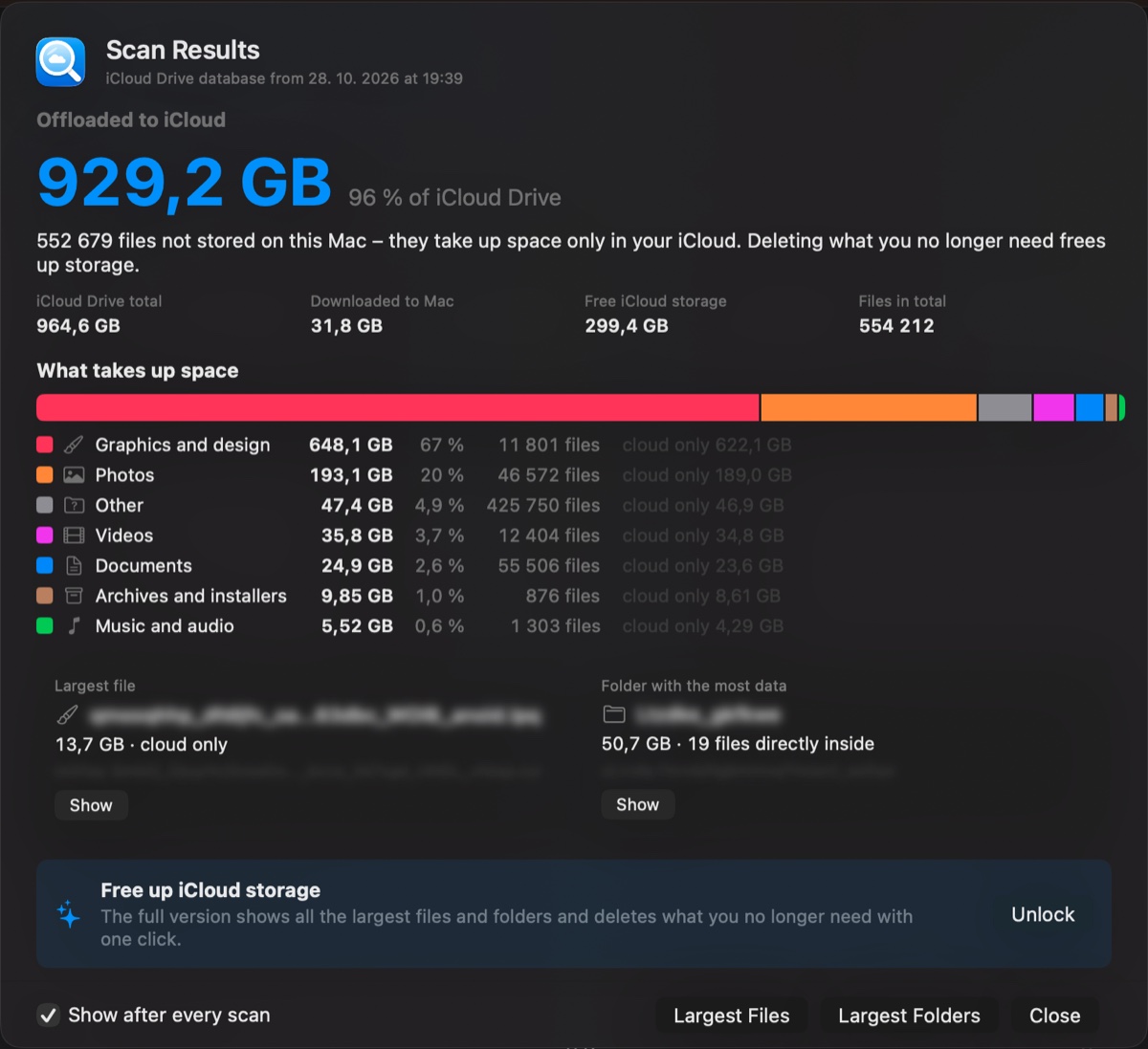
Scan Results window

See the proportions.

A colour bar splits the current folder into its parts, with a second row for the subfolders inside. Click a block to zoom in; lighter shades mean cloud-only.

Usage bar

Every folder, sized for real – then clean up.

Folders are sorted by their true iCloud size, even ones never opened on this Mac. Jump to the largest files and largest folders, collect what you don't need on a delete list that shows how much space you'll get back, then move it to the Trash in one go.
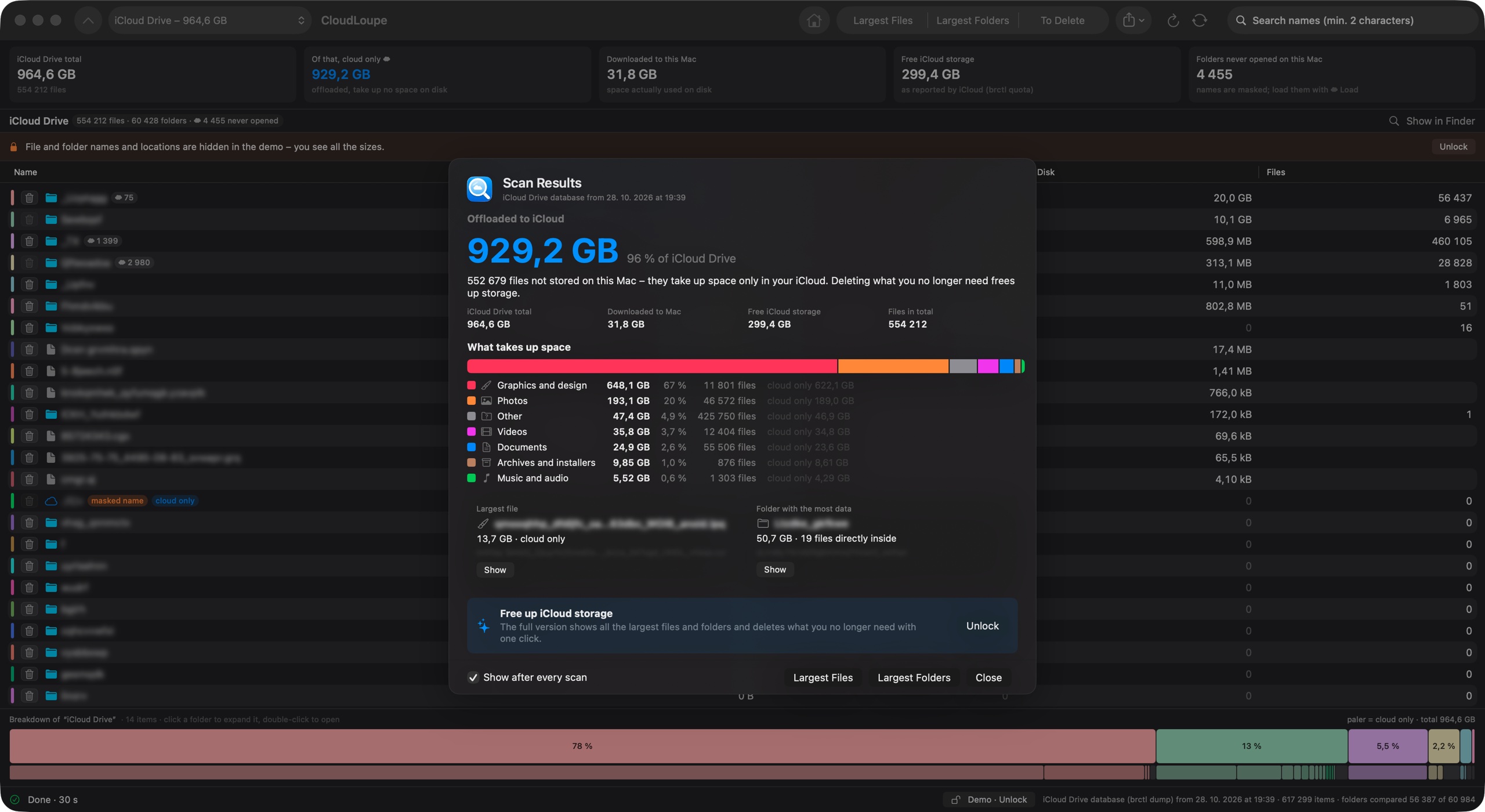
CloudLoupe window
CloudLoupe main window
Summary

Features

Small app.
Big clarity.

Counts cloud-only files

CloudLoupe knows the full size of every file in iCloud Drive – even ones that were never downloaded to this Mac. Nothing is downloaded to measure it.

Native and fast

Written in Swift for macOS. Half a million files compared in about 30 seconds.

Delete list with savings

Collect items first, see exactly how much iCloud space you'll free, then move them to the Trash.

Safe by design

Read-only until you decide. Deleting always goes to the Trash, and system folders are protected.

Find the space hogs

Largest files and largest folders anywhere below the current folder, with search by name.

App data too

See how much each app stores in iCloud – Pages, Numbers, Preview, third-party apps – not just your folders.

Export

Save the full tree as CSV or JSON for spreadsheets and your own scripts.

Free demo

Every size and chart works in the demo – names are hidden until you unlock the full version.

Your files stay
on your Mac.

CloudLoupe has no account, no analytics and no tracking. File names and sizes never leave your computer. The only thing it ever sends is your license key, once, to activate it.

Built for people with a lot in iCloud.

Photographers, designers, studios and families sharing one plan – anyone whose 2 TB filled up and who wants to know why before paying for more.

CloudLoupe main window

Pricing

Pay once. Keep it.

About what one or two months of a bigger iCloud plan cost – once.

Personal

For your own Macs

$12.99one-time
  • Use on up to 2 Macs
  • All features unlocked
  • Move the license between Macs anytime
  • Free updates for version 1
Buy Personal
Best for households

Family

For everyone at home

$19.99one-time
  • Use on up to 7 Macs in your household
  • All features unlocked
  • Move the license between Macs anytime
  • Free updates for version 1
Buy Family

Business & volume licenses

Studios, agencies, schools and companies: licenses for 10 or more Macs at a volume discount, invoiced to your company, with one key or individual keys for your team.

Request a quote

Secure checkout by Lemon Squeezy, our reseller and Merchant of Record. Prices exclude VAT where applicable.
14-day money-back guarantee. Your license key arrives by e-mail instantly.

Questions

macOS says CloudLoupe can’t be opened. What now?

Apple’s notarization of CloudLoupe is on its way; until then macOS blocks the app the first time you open it. 1) Drag CloudLoupe to Applications and open it – when macOS says it can’t be opened, click Done. 2) Open System Settings → Privacy & Security, scroll down and click Open Anyway next to CloudLoupe. 3) Confirm with your password. You only need to do this once.

Does CloudLoupe download my files?

No. CloudLoupe measures sizes without downloading anything. Files that are only in the cloud stay in the cloud. You can optionally load the names of a single folder you have never opened on this Mac – that only fetches the folder listing, not the files.

Why does Finder show different sizes?

With “Optimize Mac Storage”, Finder sizes count mostly what is downloaded on this Mac. CloudLoupe adds up the full size of every file in iCloud Drive, which is what counts towards your iCloud plan.

Can it delete something important by accident?

CloudLoupe never deletes anything on its own. You choose items, review them on the delete list and confirm. Everything goes to the Trash, so you can put it back. Desktop, Documents and the roots of app folders can't be deleted at all.

What does the free demo include?

The demo scans your whole iCloud Drive and shows every size, chart and summary. File and folder names are blurred, and actions like Show in Finder, the delete list and export need a license.

How do I move my license to a new Mac?

Open CloudLoupe → License… on the old Mac and choose “Remove license from this Mac”. Then enter the key on the new one. If the old Mac is gone, contact us and we'll free the slot.

Does it work with Photos or iCloud backups?

CloudLoupe measures iCloud Drive, including the data apps store there. iCloud Photos, device backups and Messages are stored separately by Apple; you'll see them in System Settings → Apple Account → iCloud.

Which Macs are supported?

Any Mac with macOS 14 Sonoma or later that is signed in to iCloud Drive.

Know what's in your cloud.

Free demo · Version 1.0 · 3 MB · Apple silicon & Intel · First launch: how to open CloudLoupe